There are three ways to build a tour operator website: with AI, with a web developer, or with a website builder. For most tour and activity operators, a website builder made for tours is the fastest and one of the cheapest, because live availability, booking and payment are already built in.
Here's the honest answer up front:
- New, with one or two tours and no website: use a tour operator website builder. The site can be live this week. Taking payment waits on your payment account, so apply for that first.
- Already have a website you like: keep it. Add a booking calendar to it. Don't rebuild.
- Want something no builder can give you, and have the budget: hire a web developer, and connect a booking system to what they build.
I spent six years in product marketing at Rezdy, Checkfront and Regiondo before co-founding Kong, which is one of the website builders in this guide. I'm not neutral. I'll tell you where the other options are the better choice, because anything less would be useless to you.
Two things to know about Kong before you read on: we started in 2025, and we don't connect to Viator yet. If either rules us out for you, the guide still works. Prices are in US dollars, and there is one clearly marked section for operators in Malaysia, where we're based.
Which way to build your tour company website
Find your situation in the left column.
| Your situation | What to pick | Why |
|---|---|---|
| No website, taking bookings on WhatsApp | A website builder made for tours | Live in days. Booking and payment are built in. |
| A Wix or WordPress site you're happy with | Keep it, add a booking calendar | Cheapest and fastest. Nothing to rebuild. |
| A site you're embarrassed by | A tour website builder, or AI if you enjoy tinkering | Starting again is quicker than fixing it. |
| You want a one-of-a-kind brand site | A web developer, plus a booking system | Full control over the look. Costs the most. |
| You're comfortable with tech and enjoy building | AI for the pages, a booking system for bookings | Cheap and flexible, but you're the one who fixes it. |
| Most of your bookings come from Viator | Bokun or Rezdy today, not Kong | Your availability has to stay in step everywhere you sell. Kong connects to GetYourGuide but not to Viator yet. |
| Several activities, staff and vehicles | A tour builder, chosen on fees and on how it handles your staff | The percentage fee matters more than the monthly fee. See example 3. |
What a tour operator website needs
Good tour operator website design starts with one job that most websites don't have: it has to know whether Saturday at 3pm is still open, take the money, and stop the next person booking the same seat. Most websites for tour operators get the photos and the words right and stop there.
| What your site needs | AI | Web developer | General builder (Wix, Squarespace, WordPress) | Builder made for tours |
|---|---|---|---|---|
| A page for each tour (what happens, how long, what's included and not, price) | You build it | They build it | You build it | Made from your tour details |
| Real photos | You add them | You supply them | You add them | You add them |
| Live availability | Needs a booking system | Needs a booking system | Add-on or booking system | Built in |
| Online booking and payment | Needs a booking system | Needs a booking system | Add-on or booking system | Built in |
| Fast and easy to use on a phone | Usually, check it | Depends on the developer | Usually | Usually |
| Guest reviews and a meeting point map | You add them | They add them | You add them | Often built in |
| A way to ask a question | You add it | They add it | Add-on | Depends on the builder |
Look at the two rows in the middle. With three of the four options, the booking part comes from somewhere else. That is the main thing to understand before you choose.
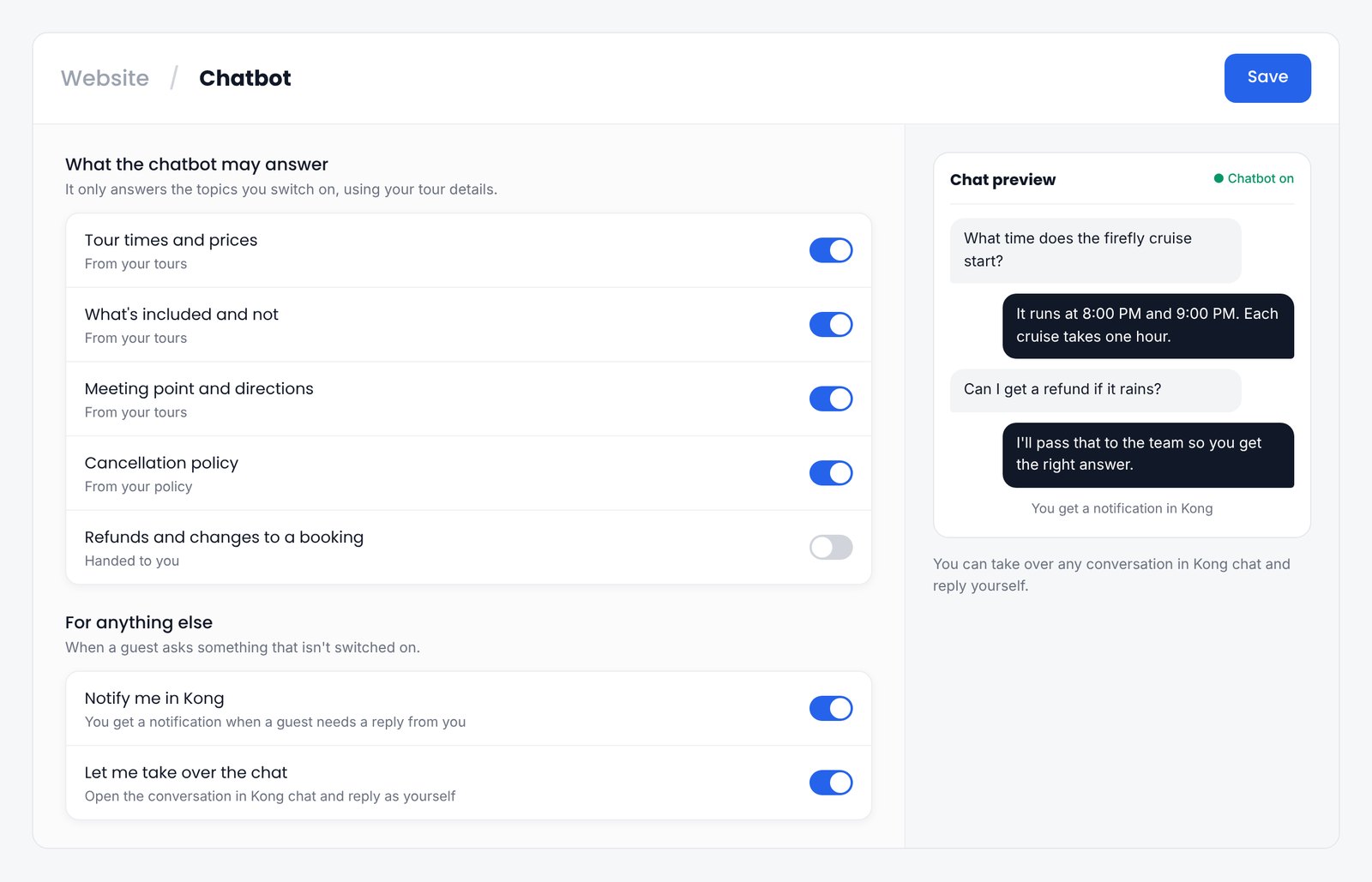
On answering questions: a WhatsApp button or live chat works when you're awake. A chatbot answers at 2am, and that's where it can go wrong. One operator we spoke to switched theirs off because it kept telling guests the wrong things about what the tour included. If you add one, pick a chatbot where you choose what it may answer, it calls you for anything else, and you can step in and chat as yourself.
How to improve your tour website's conversion: an eight-point check
Conversion is the share of visitors who go on to book. Run these on your current site, or on any site you're about to pay for.
- Can a stranger tell what the tour is, how long it takes and what it costs within ten seconds?
- Does it say what is included and what is not?
- Can they see open dates without messaging you?
- Can they pay without leaving your site?
- Does it load quickly on a phone, on mobile data?
- Are there recent reviews from real guests?
- Is the meeting point on a map?
- Is there a way to ask a question?
If you answered no to the third or fourth, that's where your bookings are leaking.
How to create a tour operator website: the three methods at a glance
| Build it with AI | Hire a web developer | Use a website builder | |
|---|---|---|---|
| Upfront cost | Close to $0 | $1,500 to $8,000 for a small site | $0 |
| Ongoing cost | $2 to $25 a month, plus a booking system | Hosting, a domain and paid changes, plus a booking system | General: about $18 to $40 a month for the plans small businesses use. Made for tours: $0 to $499 a month plus a fee per booking |
| Time to launch | An afternoon for the pages. Longer for bookings | 2 to 8 weeks | A day to a week |
| Skill needed | Some. You need to be comfortable when something breaks | None, but you need to brief them well | Little |
| How guests book and pay | Through a booking system you connect | Through a booking system they connect | General: an add-on. Made for tours: built in |
| Who keeps it updated | You | Them, usually for a fee each time | You, in a few clicks |
| Who fixes it when it breaks | You | Them, if they're still around | The builder's support team |
| Best for | Tinkerers on a budget | Operators with a clear brand and a budget | Most operators |
What a tour operator website costs: three examples
For a small operator, a tour operator website costs about $700 to $2,100 in its first year with a builder made for tours, about $800 to $1,600 with Wix or AI, and $2,900 to $6,500 with a web developer, all in. One tour builder, FareHarbor, costs you $450, because your guests pay about $900 in booking fees on top.
Each table has two figures. You pay is everything that comes out of your pocket in year one: the website, the booking system, the booking fee, and card processing at about 3% of sales. (Stripe charges 2.9% plus 30 cents in the US and 3% plus RM 1 in Malaysia.) Your guests pay is any booking fee added on top of your price at checkout. Your own time isn't counted.
Tour builders are in alphabetical order. Kong is ours.
Example 1: New operator, one tour, no website
300 online bookings a year at $50 each. That's $15,000 in online sales.
| Method | What's in the figure | You pay | Your guests pay |
|---|---|---|---|
| AI | Lovable Pro, a domain, and Bokun START as the booking system | $1,578 | Nothing extra |
| Web developer | A freelancer, hosting, a domain, and Bokun START | $2,863 to $6,463 | Nothing extra |
| Wix | Wix Core, using Wix's own booking tool | $807 | Nothing extra |
| Bokun | START: $49 a month plus 1.5% | $1,263 | Nothing extra |
| Checkfront | $99 a month plus 3% | $2,088 | Nothing extra |
| FareHarbor | No monthly fee. Booking fee of up to 6%, charged to guests | $450 | About $900 |
| Kong | No monthly fee, 1.8% | $720 | Nothing extra |
| Rezdy | Foundation: $49 a month plus 3% | $1,488 | Nothing extra |
The AI and developer rows use Bokun START as the booking system so there is one number to compare. Swap in any tour builder from the rows below.
Two notes. Wix's own booking tool is built for classes and appointments. It can cap the number of people in each session, which covers a simple tour. Check that it handles your pricing (adults, children, private groups) and the marketplaces you sell on before you rely on it. And FareHarbor's figure is its fees only. Having their team build your website is a separate service, widely reported at $5,000 a year or $499 a month. FareHarbor doesn't publish the price.
Example 2: You have a Wix site and take bookings on WhatsApp
You move $40,000 a year of bookings online. Your Wix plan stays as it is and isn't counted.
| Method | What's in the figure | You pay | Your guests pay |
|---|---|---|---|
| Keep Wix, add Bokun | START: $49 a month plus 1.5% | $2,388 | Nothing extra |
| Keep Wix, add Checkfront | $99 a month plus 3% | $3,588 | Nothing extra |
| Keep Wix, add FareHarbor | No monthly fee. Booking fee of up to 6%, charged to guests | $1,200 | About $2,400 |
| Keep Wix, add Kong | No monthly fee, 1.8% | $1,920 | Nothing extra |
| Keep Wix, add Rezdy | Foundation: $49 a month plus 3% | $2,988 | Nothing extra |
| Rebuild with AI | Lovable Pro, a domain, and Bokun START | $2,703 | Nothing extra |
| Rebuild with a developer | A freelancer, hosting, a domain, and Bokun START | $3,988 to $7,588 | Nothing extra |
If you like your site, keeping it wins. A rebuild only pays off if the site itself is the problem.
Example 3: Several activities, staff, $250,000 a year in online sales
| Method | What's in the figure | You pay | Your guests pay |
|---|---|---|---|
| Bokun START | $49 a month plus 1.5%. Up to 5 users | $11,838 | Nothing extra |
| Bokun PLUS | $149 a month plus 1.25%. Up to 10 users | $12,413 | Nothing extra |
| Checkfront | $99 a month plus 3% | $16,188 | Nothing extra |
| FareHarbor | No monthly fee. Booking fee of up to 6%, charged to guests | $7,500 | About $15,000 |
| Kong | No monthly fee, 1.8% | $12,000 | Nothing extra |
| Rezdy Accelerate | $99 a month plus 3% | $16,188 | Nothing extra |
One thing to know at this size. Once you pass about $196,000 a year in online sales, Bokun START costs less than Kong, because its percentage is lower. START allows up to 5 users. A bigger team needs Bokun PLUS, which passes Kong at about $325,000 a year. How each system handles guides, vehicles and staff matters as much as fees here, so ask each one for a demo.
About passing the fee to guests. Bokun, Checkfront, Kong and Rezdy also let you move the booking fee to the guest, as FareHarbor does, and Kong lets you split it. That shifts the fee from the "you pay" column to the "your guests pay" column: $270 with Kong in example 1, $225 with Bokun. It isn't free. The guest sees a higher price at checkout than on your tour page, and some will leave. Try it before you rely on it.
Bookings you take yourself. With Bokun, Checkfront and Kong, bookings you take by phone, WhatsApp or walk-in and enter yourself carry no booking fee from the booking system. Rezdy charges $0.70 to $1 for each one.
Already have a website? Start here
You do not have to rebuild. If your site looks fine and guests can find it, the only thing missing is a way to book and pay.
How to accept bookings on a tour website you already have
- Sign up for a booking system and add your tours, times, prices and how many people each one takes.
- Connect a payment account so money goes to you. That's an account with a payment provider such as Stripe.
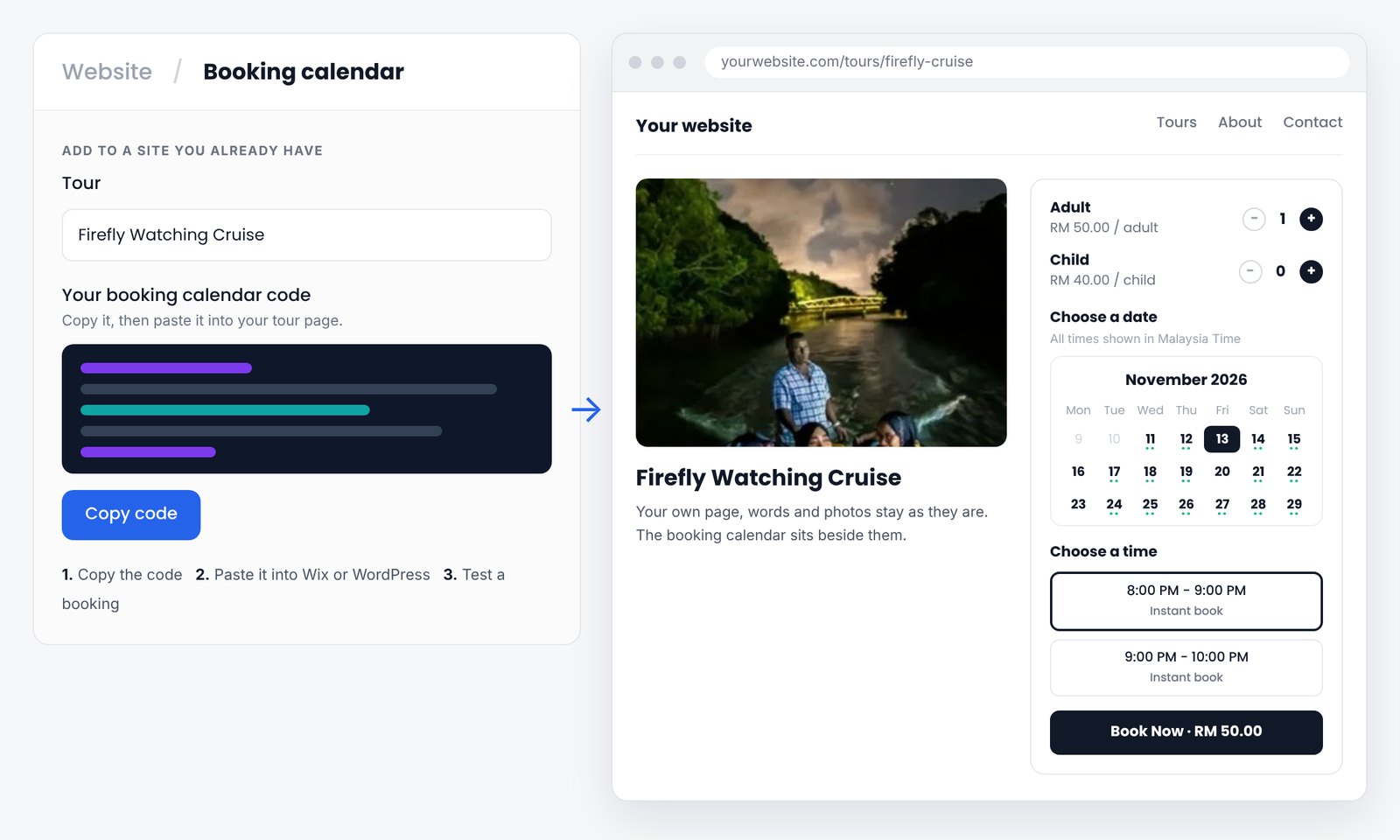
- Copy the booking calendar code the system gives you. It's a few lines of text.
- Paste it into your tour pages in Wix or WordPress (this is called embedding), and test a real booking on your phone.
Your pages, your web address and your place on Google stay as they are, because you're adding a calendar to pages that already exist. If the calendar doesn't show up properly, the booking system's support team should help you place it. Ask before you sign up.
With Kong, the booking calendar can be embedded in a site you already have.
Start again instead if your site is slow or hard to use on a phone, you can't update it yourself, or you avoid sending people to it.
Method 1: Build it with AI
Building a tour operator website with AI costs about $2 to $25 a month and takes an afternoon. It works well for the pages. It doesn't give you live availability or payment, so you still need a booking system.
"Build it with AI" means two different things:
- AI website builders. You answer a few questions and it makes a site. Wix includes AI tools in every plan. 10Web's starts at $10 a month billed yearly, and Hostinger's at $1.99 a month if you prepay four years.
- Building from scratch with an AI tool. You describe the site to a tool like Lovable, Claude or ChatGPT and it writes it for you. Lovable Pro is $25 a month and lets you use your own domain.
What it's good at: a good-looking site fast, low cost, and changing words or layout by asking in plain language.
Where it falls down: an AI tool can make a booking form in seconds, but a form is not a booking system. It doesn't know the 3pm slot is full, and it doesn't stop two people booking the last seat. You can ask AI to build that too. A booking engine company called CaptainBook made a fair point about this in August 2026: building the first version is no longer the costly part. What comes after is. Payments, refunds and chargebacks (when a guest disputes a payment with their bank). Keeping the site up and secure. And someone to call when it breaks on a Saturday in peak season.
Even GoDaddy's AI builder page tells tour operators to embed a checkout from a booking system. So use AI for the pages and a booking system for the bookings.
It suits you if you enjoy this kind of thing and don't mind fixing it yourself. Avoid it if you want to set it up once and get back to running tours.
Method 2: Hire a web developer
Hiring a web developer for a tour operator website costs $1,500 to $8,000 for a small site and takes 2 to 8 weeks. You get a custom tour company website design, and you still need a booking system connected to it.
You can get website design for tour operators from three kinds of people.
| Kind | What you get | Typical cost |
|---|---|---|
| Freelancer | One person, usually working from a template | $1,500 to $5,000 |
| General web agency | A team, a more custom design | $3,000 to $8,000 for a small local agency, $10,000 to $20,000 for fully custom |
| Agency that only does tour operator web design | People who already know what makes guests book | Usually a quote. TourismTiger, for example, has built over 300 tour websites since 2014. Its package with a logo, branding and a starter website is from $3,595 |
Tour operator website development doesn't end at launch. Budget for hosting, which is the service that keeps your site online ($40 to $150 a year), your domain ($12 to $25 a year), and paid changes.
What it's good at: a site built the way you want it, by someone else, with a design nobody else has.
Where it falls down: it costs the most, every change is a message and often a bill, and if the developer moves on you may be left with a site nobody can update.
Questions to ask before you hire:
- Which booking system will you connect, and what will it cost me each month?
- Can I change prices, photos and tour times myself, without calling you?
- Who owns the domain, the hosting account and the logins? (It should be you.)
- If we stop working together, what do you hand over?
- Can I see a tour website you built, and may I speak to that operator?
- What do you charge for changes after launch?
It suits you if you have a clear brand and the budget for it. Avoid it if you're just starting, or you change tours and prices often.
Method 3: Use a website builder
A website builder is the quickest way to get a tour website live. There are two kinds, and they solve different problems.
General website builders
| Builder | Price | Bookings and payment |
|---|---|---|
| Wix | $17.77 to $159.77 a month, billed yearly. Bookings need Core ($29.77) or above | Its own booking tool, built for classes and appointments, with a limit on people per session. Or embed a tour booking system |
| Squarespace | $19 to $99 a month, billed yearly | Bookings come from Acuity Scheduling, a separate Squarespace product reported at $16 a month and up |
| WordPress with Elementor | Free version. Paid from $60 a year. Hosting is extra | A plugin (an add-on for WordPress) or an embedded booking system |
| WordPress with WP Travel Engine | $12 to $29 a month for one site, billed yearly | A plugin made for tour operators: trips, itineraries and bookings |
These are good at design, with hundreds of templates. The catch is that tour bookings are an add-on, so you manage two things. Wix also says its sites have to stay on Wix: you can use your own domain, but the site doesn't export to another host.
Website builders made for tours
Here the website and the booking system are the same thing. Add a tour once, and its page, calendar and checkout all exist.
A reminder: Kong is ours. The table is alphabetical, and the one after it shows where the others beat us. These five aren't the whole market. Peek, Xola and TrekkSoft are other well-known tour booking systems. I've stuck to the ones I know best.
| Tour website builder | Monthly fee | Fee per online booking | Who can pay the fee | Website |
|---|---|---|---|---|
| Bokun | $49, $149 or $499 | 1.5%, 1.25% or 1% | Operator, or guest on paid plans | Website builder included from START, and Bokun covers the domain |
| Checkfront | $99 | 3% | Operator or guest | Booking calendar for your own site. Its comparison pages list a website builder as included. Its pricing page doesn't mention one, so ask |
| FareHarbor | $0 | Up to 6% | The guest | A paid service where their team builds your site, reported at $5,000 a year |
| Kong | $0 | 1.8% | Guest, operator, or split | Included, with your own domain and hosting |
| Rezdy | $49, $99 or $249 | 3%, plus $0.70 to $1 per offline or agent booking | Operator or guest | "1-Click website" on every plan |
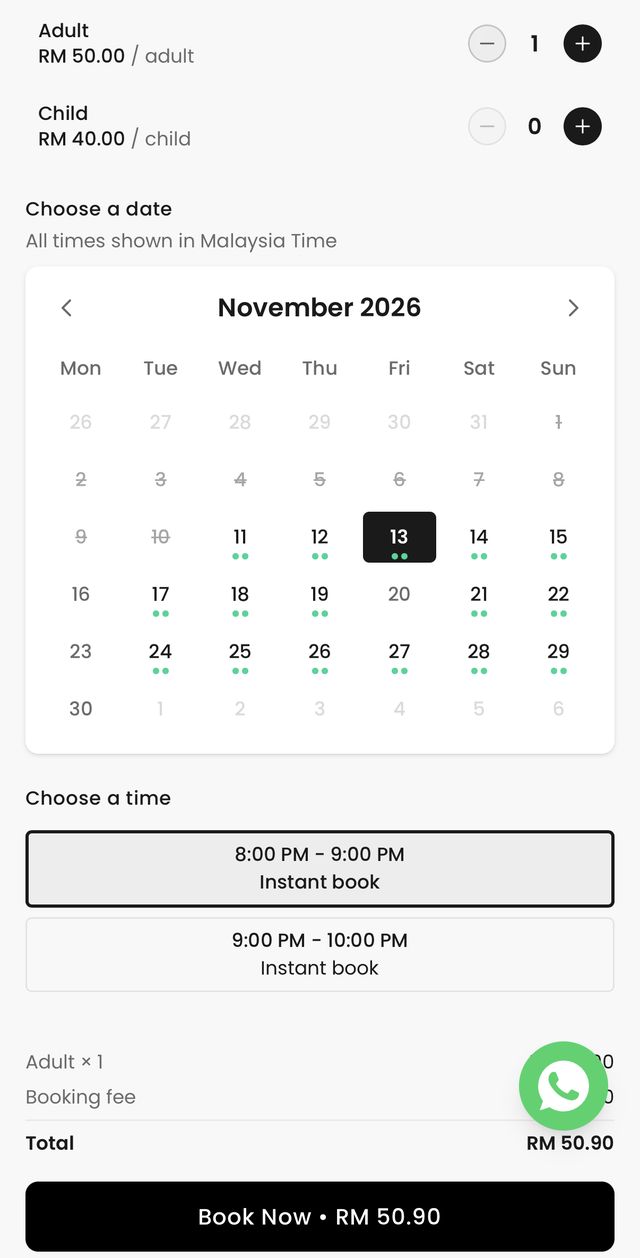
Kong's tour operator website builder also includes guest waivers, a WhatsApp button, reviews, a meeting point map and an AI chatbot, where you set what it may answer and when it calls you. That matches my chatbot advice earlier because it's how we chose to build ours, so weigh that advice with my bias in mind.
Where the others are the better choice than Kong
| They win on | Why it matters | The detail |
|---|---|---|
| Bokun: fees at high volume | A lower percentage adds up | Past about $196,000 a year in online sales, Bokun START costs less than Kong if you pay the fees yourself. For teams over 5 users, the figure is about $325,000 |
| Bokun: Viator and Tripadvisor | If Viator is your main source of bookings, this is a big deal | Bokun is owned by Tripadvisor, which also owns Viator, and charges no Bokun booking fee on Viator bookings on its paid plans |
| Bokun and Rezdy: selling through other sites and agents | More places to sell your tours | Kong connects to GetYourGuide today. Viator and Klook are in development, with no date I can give you |
| Rezdy and Checkfront: track record | Years of operators using them at scale | Kong started in 2025 |
| FareHarbor: they do it for you | Some operators don't want to build anything | Their team builds and runs the site. You pay for it, and your guests pay the booking fee |
| Wix and Squarespace: design freedom | Your site can look exactly how you want | Kong's sites follow a set structure built around getting a booking |
For a wider look, see our roundup of the best booking software for tour operators, and our comparisons with Bokun, Rezdy, Checkfront and FareHarbor.
If you run tours in Malaysia
Check payment methods before anything else. Many Malaysian guests pay by FPX online banking or an e-wallet, and not every builder or payment provider offers those. Kong connects to Stripe, Xendit and HitPay and its checkout takes FPX and GrabPay alongside cards, Apple Pay and Google Pay.
Local developers also charge less than the US prices above: about RM 1,000 to RM 3,500 for a freelancer and RM 3,000 to RM 8,000 for a small agency. For everything else, multiply the dollar figures by about 4.1.
What happens if you want to leave
Before you build on any platform, ask three questions: do I keep my domain, can I get my bookings and guest details out, and can I take the website with me?
| Method | Your domain | Your bookings and guest details | The website itself |
|---|---|---|---|
| AI | Yours, if you bought it | Wherever your booking system keeps them | You own the files, but you need someone who can move them |
| Web developer | Yours, if it's in your name. Check | Wherever your booking system keeps them | Depends on what the developer hands over. Agree it in writing |
| Wix | Yours | Ask before you commit | Stays on Wix. Moving means rebuilding |
| WordPress | Yours | Depends on the plugin | Can be moved to another host |
| Kong | Yours. You buy it, so it goes with you | You can export them anytime | The pages stay with Kong. Your words and photos are yours to reuse |
| Other tour builders | Usually yours | Ask what you can export, and in what format | Stays with the builder. FareHarbor, for example, says your content goes with you but its template doesn't |
Kong has no lock-in contract. And the rule that keeps you safe with every method: buy your domain yourself, in your own name. Your Google ranking, your reviews link and your printed flyers all point at that address.
Your first week, and getting found
A website makes direct bookings possible. It doesn't bring them. Here's what to do first, and then how people find you.
Your first week
- Day 1: apply for a payment account. That's an account with a payment provider such as Stripe, which takes card payments and pays the money into your bank. You apply on the provider's website with your business and bank details. Approval can take days or weeks, so start here.
- Day 1: buy your domain, which is your web address, in your own name. Registrars such as Namecheap or GoDaddy sell them for about $12 to $25 a year.
- Day 2: gather what you'll need: ten good photos, a description of each tour, what's included and not, your cancellation policy, and your meeting point.
- Day 3: add one tour and get it right before adding the rest.
- Day 4: make a real booking on your own phone, with a real card, and refund it.
- Day 5: put your booking link everywhere guests already find you: WhatsApp, Instagram, Facebook and your Google listing.
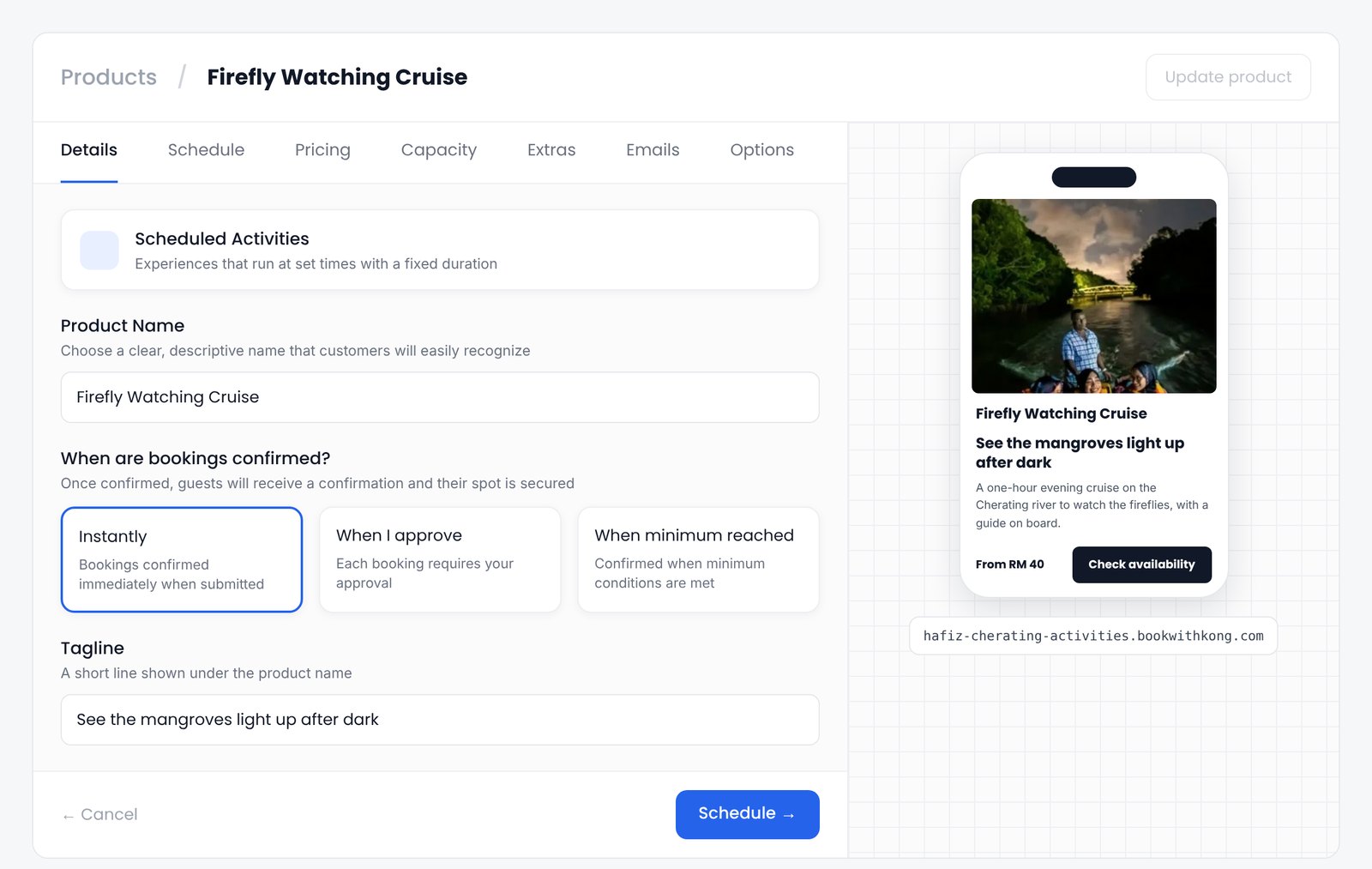
Plan on a few hours across the week with a builder made for tours, and longer with the other methods.
Getting found
- Google Business Profile. It's free, and it's how most guests find a local tour. Claim it, pick the right category, add photos and put your booking link on it.
- Reviews. Ask every guest on the day, and send the link while they're still happy. Recent reviews do more for bookings than a new design.
- Guests you already have. Give repeat guests and referrals your direct link. If you sell on Viator or GetYourGuide, check their terms before you point those guests elsewhere.
- AI answers. People now ask ChatGPT and Google's AI what to do in your town. Clear tour pages with prices, times and what's included are what those tools read.
Questions operators ask
What is the best website builder for a tour company?
For most small tour companies, a website builder made for tours is the best fit, because availability, booking and payment are built in. Kong has no monthly fee and charges 1.8% per online booking. FareHarbor has no monthly fee either, because your guests pay its booking fee of up to 6%. Bokun starts at $49 a month plus 1.5% and is the stronger choice if you sell mostly through Viator.
Should I use Wix or WordPress for my tour business?
Wix is easier to look after, but your site has to stay on Wix. WordPress gives you more control and can move between hosts, but someone has to keep it updated. Wix's own booking tool can cover a simple tour with a set number of seats. For anything more, add a tour booking system to either one.
Can I build my tour website with AI?
Yes, for the pages. AI tools can produce a good-looking site in an afternoon for $2 to $25 a month. They don't give you live availability, safe payment or protection against double bookings, so connect a booking system for those.
Do I need a web developer for a tour website?
Most operators don't. A website builder covers what a typical tour business needs for far less. A developer makes sense when you want a custom design and can spend $1,500 to $8,000 or more.
How much does a tour operator website cost?
For a small operator taking $15,000 a year online, year one costs about $700 to $2,100 all in with a builder made for tours, about $800 with Wix and its own booking tool, about $1,600 with AI plus a booking system, and about $2,900 to $6,500 with a freelance developer. Those figures include card processing at roughly 3%. FareHarbor costs the operator $450, with guests paying about $900 in booking fees on top.
How do I take bookings and payments on my website?
You need a booking system that tracks your availability, a payment account so the money reaches you, and a booking calendar on your tour pages. A builder made for tours gives you all three together. On an existing Wix or WordPress site, you paste in a booking calendar from a booking system.
Should a tour operator website have a chatbot?
Only if guests often message you outside working hours with the same questions. Choose one where you decide what it may answer, it contacts you for anything else, and you can take over the chat yourself.
What is the best website builder for tour operators in Malaysia?
Start with payment methods, because many Malaysian guests pay by FPX or e-wallet. Kong is based in Kuala Lumpur, has no monthly fee, and connects to Stripe, Xendit and HitPay. If you sell heavily through Viator, compare it with Bokun first.
Where these prices come from
Every price was checked on 23 November 2026, on each company's own pricing page: Wix, Squarespace, Lovable, Elementor, WP Travel Engine, Bokun, Rezdy and Checkfront. Card processing rates are from Stripe. FareHarbor doesn't publish its website service price, so that figure comes from several industry write-ups, not from FareHarbor. Developer costs come from published 2026 price guides. If you spot a price that's out of date, message me and I'll fix it.